

The AlphaTheta DDJ-GRV6 is a four-channel DJ controller built for DJs who want a much more club-inspired layout than a typical entry-level controller, while still keeping the flexibility of laptop and mobile DJ software. Its headline features are the Groove Circuit in rekordbox, Stems FX in Serato DJ Pro, large 206 mm jog wheels, four-deck control, a four-channel mixer and a control layout influenced by AlphaTheta’s current CDJ and DJM equipment.
It is an important model in AlphaTheta’s range because it sits between simpler two-channel controllers and considerably more expensive flagship systems. The DDJ-GRV6 gives you more room to grow than a basic controller without forcing you into a standalone system or a full club-style separates setup. For DJs who want to learn four-channel mixing, use stems and effects creatively, or practise on a layout that feels closer to larger booth equipment, it has a lot to offer.
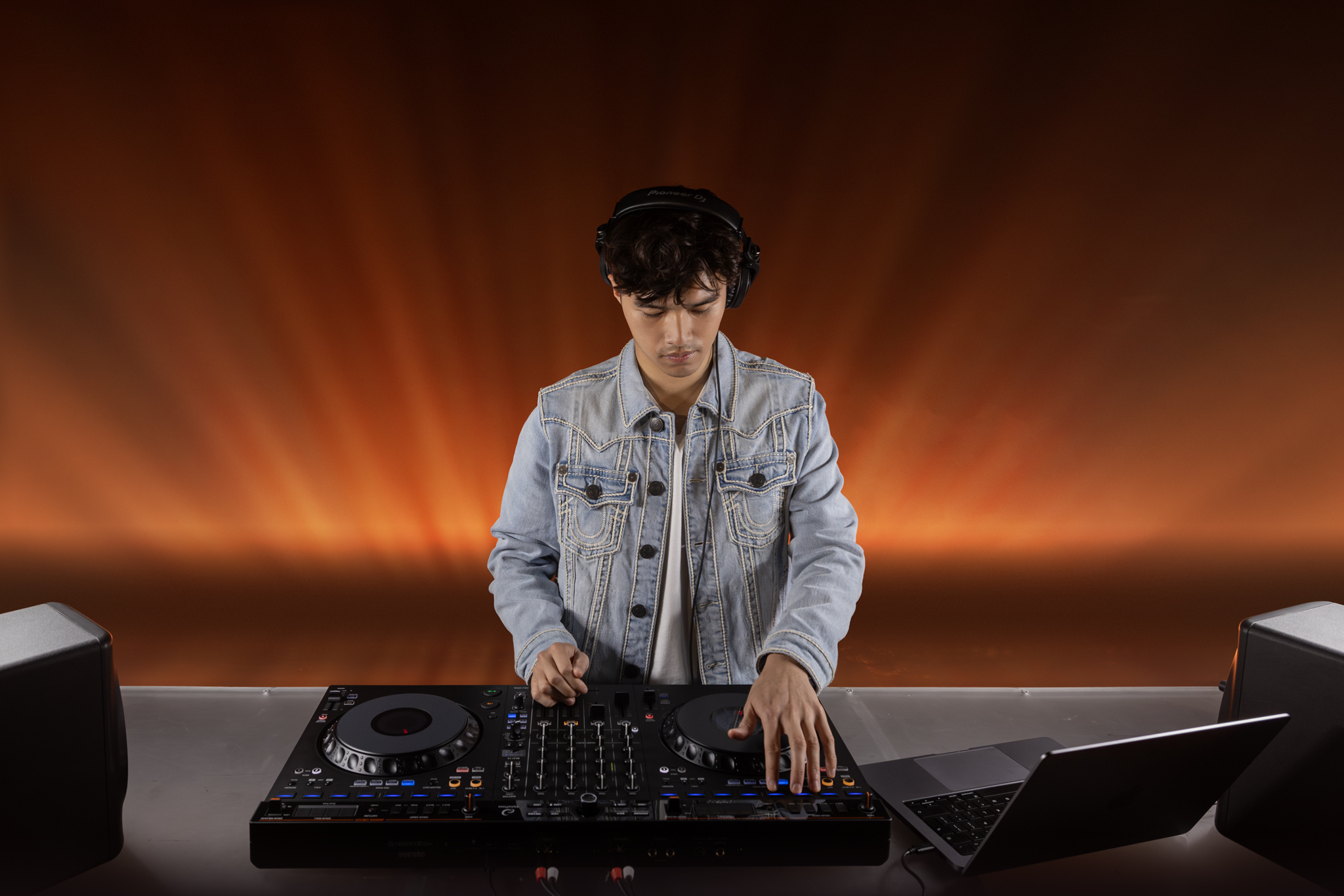
AlphaTheta DDJ-GRV6: key features at a glance
- Four-channel DJ controller with four-deck control on supported desktop software.
- 206 mm jog wheels designed to give a much larger working surface than compact controllers.
- Groove Circuit for live drum-part manipulation in rekordbox for Mac and Windows.
- Stems FX control when used with Serato DJ Pro.
- Eight performance controls above each jog wheel, following the layout direction of AlphaTheta’s larger player systems.
- Four-channel mixer with three-band EQ, channel faders, crossfader and effects control.
- Smart Rotary Selector for deeper hardware-based library navigation.
- Built-in audio interface with balanced master output, RCA master output and separate RCA booth output.
- Two headphone connections and one microphone input.
- USB-C connectivity and class-compliant operation.
- rekordbox, Serato DJ Pro and djay support, with mobile support available on compatible platforms.
- 4.6 kg weight, making it large enough to feel substantial while remaining transportable.
What is the DDJ-GRV6 designed to do?
The DDJ-GRV6 is aimed at DJs who have outgrown a basic two-channel controller or who want to start with something that offers considerably more performance depth. It is not a standalone DJ system: it is designed to work with compatible DJ software on a computer or supported mobile device. The controller handles the physical mixing, browsing, deck control, effects and performance functions while the software manages the music library, waveform display, analysis and playback engine.
Its biggest strength is that it does not feel like an oversized beginner controller. The layout deliberately pushes the decks and mixer towards AlphaTheta’s current club-oriented design language. The performance controls sit above the jog wheels rather than underneath them, the mixer follows a familiar four-channel arrangement, and the effects section is positioned and organised in a way that should make moving to larger AlphaTheta equipment less disorientating.
At the same time, it remains very much a software controller. The four mixer channels are for software decks, not for connecting four external sources. This distinction matters: the GRV6 offers four-channel mixing, but it is not a conventional hardware mixer with phono and line inputs on each channel.
Design and build
The DDJ-GRV6 is a wide controller at 711.4 mm across, so it gives each deck a generous amount of space. The large jog wheels dominate the left and right sections, with the performance controls, loop functions, deck selection and transport controls arranged around them. The central mixer uses four full channel strips, while the upper-middle section houses browsing and loading controls.
The chassis is still primarily aimed at the controller market rather than the premium metal construction of high-end booth equipment. That keeps the weight to 4.6 kg, which is useful if the controller will be transported regularly. The trade-off is that some controls feel lighter than the hardware found on flagship systems. Independent reviews have nevertheless generally regarded the GRV6 as a clear step forward in presentation and solidity compared with the older DDJ-FLX6.
The styling is restrained: matte-black surfaces, limited visual clutter and clear spacing between the main functional areas. That is useful in practice because the controller includes a lot of functions without looking excessively busy.
Large 206 mm jog wheels
The 206 mm jog wheels are one of the most important physical features of the DDJ-GRV6. They are significantly larger than the jogs on many compact controllers and provide more surface area for nudging, cueing and scratching. AlphaTheta’s current product information positions the jog size alongside the company’s latest larger player designs.
For DJs learning manual beatmatching or more hands-on cueing techniques, larger jog wheels can make fine timing adjustments feel more natural. Scratch DJs will also appreciate the extra physical space, although the GRV6 is not specifically a battle-style controller and its mixer/crossfader layout is more general-purpose.
Performance controls above the jog wheels
Instead of the familiar two rows of rubber performance pads underneath each jog wheel, the DDJ-GRV6 places eight performance controls in a horizontal row above each deck. This mirrors the direction taken on AlphaTheta’s newer players and gives the decks a more club-like visual structure.
These controls are not limited to Hot Cues. Depending on the software and selected mode, they can access Hot Cues, Stems, Beat Jump, Sampler functions, loops, effects and key-related performance modes. The result is that the GRV6 keeps much of the flexibility associated with controller performance pads while presenting the controls in a layout that is closer to current AlphaTheta player hardware.
There is a compromise here. DJs who are used to large RGB rubber pads may prefer the tactile feel and visual feedback of a traditional pad section. The GRV6’s controls are more like dedicated buttons than classic MPC-style pads. Whether that feels like an improvement will depend on how heavily you use finger-drumming, pad FX or rapid cue-point routines.
Four-deck control and deck switching
The GRV6 supports four-deck control on compatible desktop software. Each physical deck can switch between two software decks, allowing the left side to control decks 1 and 3 and the right side to control decks 2 and 4. This makes it possible to layer additional tracks, loops, acapellas or rhythm parts without needing four physical player sections.
Four-deck mixing is particularly useful for DJs who want to move beyond straightforward track-to-track transitions. You can keep a loop running on one deck, bring in an acapella on another, layer percussion or use a spare deck for samples and transition tools. The GRV6 gives you enough mixer channels to make these techniques practical without constantly reassigning a two-channel mixer.
The four-channel mixer section
The central mixer provides four channels with individual trim controls, three-band EQ, channel faders and cueing. A crossfader sits at the bottom of the mixer. The layout is immediately familiar if you have used Pioneer DJ or AlphaTheta mixers before, and it is much closer to a conventional DJM-style arrangement than many controllers with highly customised mixer sections.
The four-channel design is a major reason to choose the GRV6 over a simpler two-channel controller. Even if you initially mix only two decks, the spare channels give you room to experiment as your DJing develops.
Channel EQ and Stems control
Modern DJ software increasingly allows the vocal, drums, bass and melodic parts of a track to be separated in real time. The DDJ-GRV6 is designed around that workflow rather than treating stems as an afterthought.
With supported software, the mixer controls can be used to manipulate separated musical elements. This makes it possible to remove vocals from one track, retain the drums from another or create cleaner transitions between songs with clashing vocal sections. Stems can also be combined with the GRV6’s dedicated performance controls for more elaborate live remixing.
Groove Circuit in rekordbox
Groove Circuit is the feature that gives the DDJ-GRV6 its name and most clearly separates it from a conventional four-channel controller. It is available in rekordbox for Mac and Windows and is designed around manipulating the drum component of a track while it is playing.
Rather than requiring you to isolate drums, find a suitable loop, load it and manually line everything up, the dedicated Groove Circuit controls bring several of those actions directly onto the hardware. The idea is to make live remixing fast enough to use during a normal DJ set.
Drum Swap
Drum Swap lets you replace the drum part of the currently playing track with a different drum loop. This can radically change the character of a track without replacing its vocals, bass line or melodic elements. A house track can be given a breakbeat feel, for example, or a familiar vocal can be placed over a very different rhythmic foundation.
AlphaTheta provides downloadable drum loops to help users start experimenting immediately. The feature is not limited to the supplied material: DJs can also create and organise their own rhythmic content.
Drum Capture
Drum Capture allows the drum section of a playing track to be captured and used as material for later Groove Circuit performance. This turns tracks in your own library into potential sources for new drum loops rather than limiting you to factory content.
That opens up interesting possibilities for genre-crossing sets. You can take the rhythmic feel from one track and apply it underneath elements from another, then return to the original drums when you want to restore the full arrangement.
Drum Roll and Trans
Drum Roll and Trans apply rhythmic effects specifically to the drum part. Because the effect is focused on drums rather than the whole mix, you can create fills and build-ups without necessarily chopping the vocal or melodic content at the same time.
Drum Release
Drum Release is designed for breakdowns and transition moments. It can remove the drum part while introducing a release-style effect, creating a cleaner way to strip energy out of a track before bringing the rhythm back in.
The overall value of Groove Circuit depends heavily on mixing style. DJs who enjoy mashups, stems, live edits and creative transitions are likely to use it far more than DJs who prefer long, traditional blends. The important point is that the GRV6 remains a capable four-channel controller even if Groove Circuit is not central to your sets.
Serato DJ Pro: Stems FX instead of Groove Circuit
When the GRV6 is used with Serato DJ Pro, the Groove Circuit area takes on a different role. The controls become dedicated Stems FX controls, and AlphaTheta supplies an overlay sheet so the labels can be changed to match the Serato functions.
Serato’s implementation lets you manipulate individual stems and apply effects including Roll, Transform, Roll Out and Delay. This means the hardware area remains useful rather than becoming a row of rekordbox-only buttons when you switch software.
The DDJ-GRV6 is a Serato DJ Pro hardware-unlock device. When the controller is connected to supported Serato DJ Pro software, the hardware unlocks the software without requiring a separate core Serato DJ Pro licence. Optional Serato expansions and subscription features remain separate where applicable.
Effects: Sound Color-style control and Beat FX
The effects section is another area where the GRV6 tries to prepare users for larger AlphaTheta systems. Each mixer channel has a colour-style effects control, while a dedicated Beat FX section provides timing-based effects that can be assigned and adjusted from the hardware.
Independent testing of the controller has highlighted a wide selection of channel and beat effects. The Beat FX section allows beat fractions to be selected so effects stay rhythmically related to the playing track, while release-style behaviour can make it easier to exit an effect cleanly.
For new DJs this may initially look like a lot of control, but it is one of the GRV6’s advantages over entry-level equipment: you can start with a simple filter and echo workflow, then gradually explore more advanced effect combinations without needing to replace the controller.
Smart Rotary Selector and library browsing
The Smart Rotary Selector is more sophisticated than a conventional browse encoder. It can rotate and press as expected, but it can also move in four directions. This allows more navigation to be handled from the controller instead of constantly reaching for a mouse or trackpad.
That matters more than it may sound. Once a library contains thousands of tracks, efficient browsing becomes a major part of performing. The GRV6’s central browsing area provides direct loading controls for all four decks, view controls and software-specific navigation functions.
In rekordbox, the Discover function can also help surface track suggestions. DJs who prefer to pre-plan every set may not need this often, but it can be useful for open-format or longer performances where the next track is chosen in response to the room.
rekordbox compatibility
The DDJ-GRV6 is deeply integrated with rekordbox for Mac and Windows. This is where Groove Circuit is fully available, alongside Hot Cues, Stems, Beat Jump, Sampler, Keyboard, Pad FX, Beat Loop and Key Shift modes.
The controller is also listed as compatible with rekordbox for iOS and Android. Mobile operation requires a wired connection rather than Bluetooth, and power arrangements can differ from a laptop setup. If the mobile device cannot provide sufficient power, a separate USB power source or mobile battery can be connected to the controller’s power port.
Some functions and routing options are different on mobile, so anyone buying the GRV6 primarily for phone or tablet use should check the latest rekordbox mobile compatibility notes before relying on a particular feature.
Serato DJ Pro compatibility
Serato DJ Pro support is unusually important on the GRV6 because AlphaTheta has mapped the controller so that the main performance areas remain useful in Serato rather than simply mirroring rekordbox labels that do not match the software.
The controller supports four decks, Stems FX, Hot Cues, Sampler, Beat Jump, Pitch Play, Pad FX, Auto Loop and Key Shift modes in Serato DJ Pro. The included overlay sheet relabels the Groove Circuit area for Serato’s stems workflow.
The hardware is class-compliant and Serato’s current quick-start documentation states that no manufacturer-specific audio driver is required on supported macOS and Windows systems. As always, operating-system compatibility should be checked before a major computer update.
djay support
AlphaTheta’s current compatibility list also includes djay Pro for Mac and Windows and djay for iOS. This expands the GRV6 beyond the usual rekordbox-versus-Serato choice and may be useful for DJs already invested in Algoriddim’s software ecosystem.
Software features, supported controls and subscription requirements can change independently of the hardware, so djay users should check the current software requirements before purchase.
Can the DDJ-GRV6 be used with a phone or tablet?
Yes. The GRV6 supports compatible mobile software including rekordbox on iOS and Android, and djay on iOS. However, it is not a wireless Bluetooth controller. The mobile device connects by cable.
For rekordbox mobile setups, AlphaTheta’s support information explains that the controller may also need a separate USB power adapter or mobile battery if the connected mobile device cannot provide enough power. For the most straightforward home or performance setup, a laptop remains the more flexible option because it exposes the controller’s full desktop feature set.
Audio outputs and connectivity
The DDJ-GRV6 has a built-in audio interface, so it can send audio directly to powered speakers, an amplifier or a PA system without requiring a separate external sound card.
- Master 1: balanced 1/4-inch TRS output.
- Master 2: RCA output.
- Booth: separate RCA output.
- Headphones: 1/4-inch stereo jack and 3.5 mm stereo mini jack.
- Microphone: one 1/4-inch TRS microphone input.
- USB: two USB Type-C connections.
The balanced TRS master output is particularly useful for longer cable runs or connection to professional active speakers and PA equipment. The separate booth output means the DJ can have an independent monitor feed rather than splitting the main output.
The biggest connectivity limitation: no external deck inputs
The four mixer channels do not provide line or phono inputs for external decks. You cannot connect a pair of turntables or separate media players to channels 3 and 4 and use the GRV6 as a conventional four-channel hardware mixer.
This is one of the most important buying considerations. If your whole setup is laptop or mobile based, it may not matter at all. If you expect to build a hybrid setup with turntables, CDJs or other external sources, it becomes a major limitation.
Microphone and headphone connections
The GRV6 includes a microphone input for announcements, streaming or mobile-DJ use, plus both full-size and mini headphone sockets. Having both headphone sizes is convenient because it reduces the need to carry an adapter when switching between different pairs of headphones.
The microphone section is functional rather than elaborate. DJs who require multiple microphones, extensive microphone EQ or dedicated talkover processing may still prefer an external mixer or more specialised controller.
Audio specifications
AlphaTheta specifies a 20 Hz to 20 kHz frequency response, 104 dB signal-to-noise ratio over USB and 0.003% total harmonic distortion over USB. Those figures are appropriate for a modern mid-range DJ controller and indicate that the audio interface is designed for serious home, streaming and performance use.
As with any DJ system, final sound quality also depends on source files, software settings, gain structure, amplifiers and loudspeakers. Running channels constantly into the red will not be rescued by a good audio interface.
Power requirements
The controller supports USB bus power at DC 5 V / 1.5 A and can also use a DC 9 V / 3.0 A USB power adapter. A USB Type-C to Type-C cable is included, but the official accessory list does not include a power adapter.
For a conventional laptop setup, bus power keeps cabling simple. Mobile setups may require an additional power source depending on the connected device.
Setting up the DDJ-GRV6
A basic computer setup is straightforward:
- Install and update your chosen supported DJ software.
- Connect the DDJ-GRV6 to the computer by USB-C.
- Connect powered speakers, an amplifier or a PA to the master output.
- Connect headphones to one of the headphone outputs.
- Launch the DJ software and allow it to recognise the controller.
- Check the controller firmware and software compatibility before an important performance.
- Set sensible channel gain and master levels before turning the system up.
Because the GRV6 is class-compliant, the setup is less dependent on manufacturer-specific audio drivers than some older DJ systems.
How useful is the club-inspired layout?
The GRV6 is one of the more obvious choices for a controller DJ who expects eventually to play on AlphaTheta or Pioneer DJ club equipment. It will not make a controller identical to separate players and a mixer, but the placement of major controls is designed to reduce the amount of relearning required.
The performance buttons being above the jog wheels are particularly significant. Many controller DJs become used to pads underneath the platters, whereas newer AlphaTheta players place cue and performance controls above the jog area. Practising with that arrangement at home can make the physical transition less unfamiliar.
The mixer also reinforces more conventional four-channel habits: separate trims, three-band EQ, vertical channel faders and a central effects workflow. DJs coming from a basic compact controller should find plenty of room to develop more advanced mixing habits.
How does it improve on the DDJ-FLX6?
The DDJ-GRV6 replaced the DDJ-FLX6 in this part of the range and represents a change in emphasis. The FLX6 was known for large jog wheels and four-channel software mixing, but it also used several highly specific performance features such as Merge FX and Jog Cutter.
The GRV6 keeps the appealing basics — four channels and large jog wheels — while moving towards a more conventional club-style layout. Its headline performance features are also built around current stems technology rather than one-off novelty effects. That makes the GRV6 feel more relevant to the way contemporary DJ software is developing.
Build and presentation are also generally regarded as improved, although the GRV6 is still a plastic-bodied controller rather than premium booth hardware.
Who is the AlphaTheta DDJ-GRV6 best suited to?
DJs moving beyond entry-level controllers
If you already understand two-deck mixing and want four channels, larger jog wheels, more effects and a more advanced performance workflow, the GRV6 is a logical step up.
DJs who want to practise a more club-style layout
The position of the performance controls, the large jog wheels and the DJM-inspired mixer make the GRV6 particularly relevant to DJs who expect to encounter AlphaTheta or Pioneer DJ systems in clubs and venues.
DJs who use stems and live remixing
Groove Circuit in rekordbox and Stems FX in Serato give the GRV6 more dedicated remix control than a conventional controller. If separating vocals, drums, bass and melody is already part of your workflow, the dedicated hardware can reduce the amount of mouse and keyboard work required.
Open-format and mobile DJs
The four channels, microphone input, booth output and broad software support make the GRV6 flexible for open-format sets. However, mobile DJs who need multiple microphone channels or extensive external-source inputs should check whether the connection options are sufficient for their particular setup.
Who may prefer something else?
- Vinyl or hybrid DJs: there are no phono or line inputs for external decks.
- DJs wanting standalone operation: the GRV6 requires compatible DJ software and is not an all-in-one standalone system.
- DJs who need premium construction: the controller is substantial but not built like top-tier metal club hardware.
- DJs who want long pitch faders: the pitch controls are relatively compact compared with the size of the jog wheels.
- DJs who never use stems or live remixing: some of the GRV6’s most distinctive controls may be less valuable to you.
DDJ-GRV6 strengths
- Large 206 mm jog wheels.
- Four channels and four-deck control on supported desktop software.
- Layout designed to feel closer to current AlphaTheta club equipment.
- Deep rekordbox integration.
- Serato DJ Pro hardware unlock with dedicated Stems FX control.
- Groove Circuit offers genuinely unusual drum-remixing possibilities.
- Useful hardware browsing through the Smart Rotary Selector.
- Balanced master output and separate booth output.
- Two headphone socket sizes.
- Class-compliant USB operation.
- Support for computer and compatible mobile software.
- Enough depth for a DJ to grow into rather than quickly outgrow.
DDJ-GRV6 limitations
- No phono or line inputs for external turntables or media players.
- Not a standalone DJ system.
- Plastic controller construction rather than premium booth-grade build.
- Relatively short pitch faders.
- Groove Circuit is primarily a rekordbox desktop feature; Serato uses the same hardware area differently.
- Traditional pad users may prefer larger RGB rubber pads below the jog wheels.
- Mobile operation is wired rather than Bluetooth.
- Some mobile functions differ from the desktop experience.
AlphaTheta DDJ-GRV6 full specifications
General
- Product type: 4-channel DJ controller.
- Channels: 4.
- Deck control: 4 / Dual.
- Jog wheel diameter: 206 mm.
- Dimensions: 711.4 × 375.9 × 75.7 mm.
- Weight: 4.6 kg.
Audio
- Frequency response: 20 Hz – 20 kHz (USB).
- Signal-to-noise ratio: 104 dB (USB).
- Total harmonic distortion: 0.003% (USB).
- Built-in audio interface: Yes.
- Class compliant: Yes.
Power
- USB power adapter: DC 9 V, 3.0 A.
- USB bus power: DC 5 V, 1.5 A.
Inputs and outputs
- Microphone input: 1 × 1/4-inch TRS jack.
- Master 1: 1 × 1/4-inch TRS output.
- Master 2: 1 × RCA output.
- Booth: 1 × RCA output.
- Headphones: 1 × 1/4-inch stereo jack.
- Headphones: 1 × 3.5 mm stereo mini jack.
- USB: 2 × USB Type-C.
Performance controls
- Hot Cues: 8.
- rekordbox Sampler: 16 slots × 4 banks.
- Serato DJ Pro Sampler: 8 slots × 4 banks.
- rekordbox modes: Hot Cue, Stems, Beat Jump, Sampler, Keyboard, Pad FX, Beat Loop, Key Shift.
- Serato DJ Pro modes: Hot Cue, Stems, Beat Jump, Sampler, Pitch Play, Pad FX, Auto Loop, Key Shift.
Compatible software currently listed by AlphaTheta
- rekordbox for Mac/Windows.
- rekordbox for iOS/Android.
- Serato DJ Pro.
- djay Pro for Mac/Windows.
- djay for iOS.
Included accessories
- USB Type-C to Type-C cable.
- Overlay sheet for alternative software labelling.
- Quick Start Guide.
- Precautions for Use documentation.
- Warranty documentation where applicable.
Frequently asked questions
Is the DDJ-GRV6 a standalone controller?
No. It requires compatible DJ software running on a computer or supported mobile device.
Does the DDJ-GRV6 work with rekordbox?
Yes. rekordbox for Mac and Windows is one of its primary software platforms and provides the full Groove Circuit feature. Compatible rekordbox mobile versions are also supported.
Does the DDJ-GRV6 work with Serato DJ Pro?
Yes. The controller is officially supported by Serato DJ Pro and acts as a hardware-unlock device when connected.
Does Groove Circuit work in Serato?
Not in the same form. In Serato DJ Pro, the same hardware section is used for Stems FX controls instead.
Can you connect turntables to the DDJ-GRV6?
Not directly to the four mixer channels. The controller does not provide phono or line inputs for external decks.
Can the DDJ-GRV6 control four decks?
Yes, on supported desktop software. Each physical deck can switch between two software decks.
Does it have a booth output?
Yes. There is a separate RCA booth output in addition to the two master outputs.
Does it have balanced outputs?
Yes. Master 1 uses a balanced 1/4-inch TRS connection. There is also an RCA Master 2 output.
Does it have Bluetooth?
No. Mobile devices connect by cable.
Does it need a separate audio interface?
No. The DDJ-GRV6 has a built-in audio interface and can connect directly to powered speakers, an amplifier or a PA system.
Is the DDJ-GRV6 good for learning club-style DJing?
Its control placement is deliberately influenced by AlphaTheta’s larger CDJ and DJM systems, so it is one of the more relevant software controllers for DJs who want to become familiar with that general layout.
Overall view
The AlphaTheta DDJ-GRV6 succeeds because the fundamentals are strong even before its headline remix features are considered. Four channels, large jog wheels, a conventional mixer, good software support, useful browsing controls, balanced master output and a separate booth output give it a solid foundation for serious home use and performance.
Groove Circuit and Serato Stems FX then add a more modern layer for DJs who want to manipulate individual parts of tracks rather than simply mix complete songs. These features will not be equally important to everyone, but they are integrated deeply enough to be useful rather than decorative.
The main compromise is connectivity. A controller with four mixer channels can look like the centrepiece of a hybrid setup, but the GRV6’s channels are software channels only. If you want to add turntables or separate media players later, you will need a different mixer architecture. The other compromises — plastic construction and relatively short pitch faders — are more conventional for this part of the controller market.
For a DJ who wants a feature-rich software controller, intends to stay mainly inside rekordbox or Serato, and values a more club-inspired layout, the DDJ-GRV6 is a particularly capable step up from entry-level hardware.
Sources & further information
- AlphaTheta – DDJ-GRV6 official product page
- AlphaTheta – DDJ-GRV6 launch and feature information
- AlphaTheta Support – DDJ-GRV6 instruction manual and downloads
- Serato – AlphaTheta DDJ-GRV6 hardware support
- Serato Support – DDJ-GRV6 quick-start guide
- rekordbox – mobile controller compatibility
- Digital DJ Tips – AlphaTheta DDJ-GRV6 review
- We Are Crossfader – DDJ-GRV6 review and walkthrough
- MusicRadar – DDJ-GRV6 feature overview