
The AlphaTheta DDJ-FLX2 is a compact 2-channel DJ controller designed to make starting DJing as straightforward as possible without stripping away the core controls you need to learn properly. It works with smartphones, tablets, Macs and Windows PCs, supports several major DJ applications, includes its own audio interface and can be powered over USB-C. It is also AlphaTheta’s lightest and most compact DJ controller.
Its appeal is simple: the DDJ-FLX2 gives a beginner the essential building blocks of DJing — two decks, jog wheels, tempo controls, 3-band EQ, channel faders, a crossfader, performance pads, cueing and effects — in a controller that weighs only 1.2 kg. It also includes Smart Fader and Smart CFX, which can help new DJs make cleaner transitions while they are still learning manual mixing techniques.
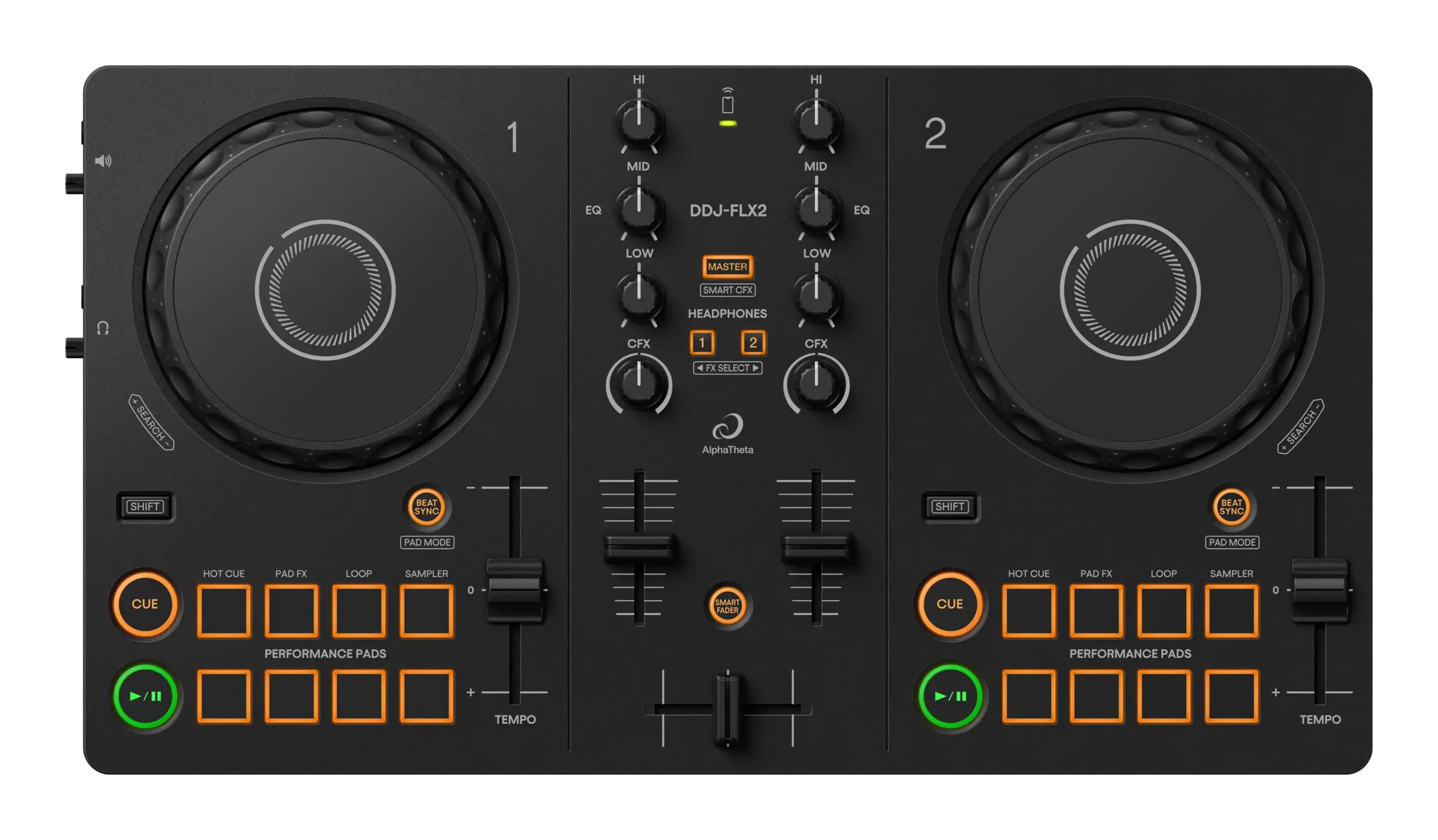
AlphaTheta DDJ-FLX2: key features at a glance
- 2-channel DJ controller aimed primarily at beginners and casual DJs.
- Compatible with smartphones, tablets, Mac and Windows computers.
- rekordbox, djay, Serato DJ Lite, Serato DJ Pro and Traktor Play support, subject to the requirements of each application.
- Streaming-service support including Apple Music, Beatport Streaming, SoundCloud Go+/DJ, Spotify and TIDAL through compatible DJ software.
- Smart Fader to assist transitions by adjusting elements such as volume, BPM and bass.
- Smart CFX for more complex effect combinations from a single control.
- Eight performance pads per deck for Hot Cues, Pad FX, loops and samples.
- Built-in audio interface with separate 3.5 mm master and headphone outputs.
- USB-C and Bluetooth Low Energy MIDI connectivity.
- USB bus powered with very low 5 V / 500 mA power consumption.
- Compact dimensions: 383.2 × 208 × 48.2 mm.
- Weight: 1.2 kg.
What is the DDJ-FLX2 designed for?
The DDJ-FLX2 is built around accessibility. It is intended for someone who wants to begin DJing without committing to a large controller, expensive computer setup or complicated audio system. You can connect it to a compatible phone, tablet or computer and start with the device and software you already own.
That makes it particularly useful for first-time DJs, younger learners, bedroom practice, travelling DJs who want a tiny second controller and anyone who values portability above advanced connectivity. It is not intended to replace a professional 4-channel controller, standalone system or club mixer. Its strength is doing the basics in a compact and flexible way.
Compared with the DDJ-200 that preceded it, one of the most important improvements is the inclusion of a built-in audio interface. You can connect headphones for cueing and send the master signal to speakers directly from the controller instead of relying entirely on the connected phone or computer for audio routing.
Design and build
The DDJ-FLX2 is deliberately simple. Each deck has a jog wheel, Play/Pause and Cue buttons, Beat Sync, a short tempo slider and eight performance pads. In the middle is a basic 2-channel mixer with 3-band EQ, channel faders, CFX controls, headphone cue selection and a crossfader.
The chassis is plastic, as you would expect from a controller designed to remain inexpensive and lightweight. Independent reviewers generally describe the build as perfectly adequate for home use and portable practice, but this is not a controller intended for the physical punishment of full-time touring.
At 383.2 mm wide and only 1.2 kg, it is genuinely easy to carry. It can fit into setups where a conventional DJ controller would be inconvenient and is light enough to take to a friend’s house, rehearsal room, radio studio or holiday without turning the controller itself into a luggage problem.
Two-deck layout and jog wheels
The DDJ-FLX2 uses a conventional two-deck layout. Each side controls one software deck, with a jog wheel for cueing, nudging and basic scratching. The jog wheels are relatively small and lightweight, which suits the compact design but does not give the same feel as the much larger jogs on controllers such as the AlphaTheta DDJ-GRV6.
For learning track positioning and basic beat correction they do the job well. DJs focused heavily on scratching are likely to outgrow them sooner because the controller’s size and lightweight construction place obvious limits on how substantial the jog response can feel.
Tempo sliders and Beat Sync
Each deck has its own tempo slider for adjusting track speed. This lets you practise manual beatmatching by bringing the BPM of two tracks closer together before using the jog wheel for fine timing corrections.
There is also a dedicated Beat Sync button. Beat Sync automatically matches the tempo of the two playing decks through supported software. Beginners can use Sync while concentrating on phrasing, EQ and track selection, then gradually learn to make those tempo adjustments manually.
The mixer section
The centre mixer keeps the controls that matter most to a beginner. Each channel has a 3-band EQ for high, mid and low frequencies, a CFX control and a channel fader. A crossfader moves between the two decks, while headphone cue buttons let you choose what you hear privately before bringing a track into the mix.
There are no dedicated channel gain controls and no hardware level meters. This is one of the major differences between the FLX2 and more advanced controllers. Modern DJ software can handle much of the gain management automatically, but learning to set channel gain manually is an important skill once you move on to larger equipment.
There is also no traditional Beat FX strip. Effects are instead handled through the CFX controls, performance-pad modes and the Smart CFX system.
Smart Fader: easier transitions for beginners
Smart Fader is one of the DDJ-FLX2’s most beginner-focused functions. When supported by the chosen DJ application, it can help manage several parts of a transition as you move the crossfader from one track to the other.
Rather than asking a completely new DJ to adjust tempo, bass and volume independently while simultaneously timing the transition, Smart Fader can automate some of those changes. This makes it possible to achieve a smoother transition very early in the learning process.
It should be viewed as a learning aid rather than a replacement for understanding mixing. Once you become comfortable with phrasing, EQ and manual level control, you can perform the same types of transitions yourself and have much finer control over the result.
Smart CFX: one-control effects
Smart CFX allows more complex effect combinations to be triggered with a simpler control movement. AlphaTheta designed it so a beginner can produce transitions and effect sequences that would normally involve several parameters.
The feature works alongside the CFX knobs and performance pads, with behaviour varying according to the connected software. It can make the controller more entertaining during the first stages of learning and gives users something creative to experiment with beyond basic EQ blending.
Eight performance pads on each deck
There are eight performance pads beneath each jog wheel. They are smaller and simpler than the full-colour pads found on larger controllers, but they provide direct access to several useful performance features without forcing you back to the laptop or phone screen.
Depending on the software, the pads can control functions such as:
- Hot Cues for instantly jumping to saved positions within a track.
- Pad FX for triggering effects rhythmically.
- Loops for repeating sections of a track.
- Sampler functions for triggering extra sounds or samples.
One useful improvement over the old DDJ-200 is that pad modes can be changed from the controller itself rather than relying entirely on the software interface.
Software compatibility
Software flexibility is one of the strongest reasons to consider the DDJ-FLX2. AlphaTheta currently lists support for several major DJ applications, so the controller is not tied to a single ecosystem.
- rekordbox for Mac/Windows
- rekordbox for iOS/Android
- djay Pro for Mac/Windows
- djay for iOS/Android
- Serato DJ Lite
- Serato DJ Pro — separate licence required
- Traktor Play
The exact features available can vary between applications. Button labels and Smart functions do not always behave identically in every program, so it is worth checking the latest compatibility information if one particular feature is essential to your setup.
rekordbox with the DDJ-FLX2
rekordbox is the most natural fit if you want to stay within the AlphaTheta ecosystem. The FLX2 can be used with desktop versions on Mac and Windows as well as compatible iOS and Android versions.
With a computer, rekordbox gives you the familiar waveform, library, cue-point and performance environment used throughout AlphaTheta’s software range. On a compatible phone or tablet, the FLX2 becomes a particularly portable practice system because the controller itself is so small.
Serato DJ Lite and Serato DJ Pro
The DDJ-FLX2 works with Serato DJ Lite, which gives beginners another way to start without buying a full software licence. It can also be used with Serato DJ Pro, but AlphaTheta’s current specifications state that a Serato DJ Pro licence is required.
This is different from some more expensive Serato controllers that act as hardware-unlock devices for the full Pro version. If Serato DJ Pro is going to be your main platform, include the software cost when comparing the FLX2 with alternatives.
djay and Traktor Play
Algoriddim’s djay is supported on both desktop and mobile platforms and is particularly interesting for users who want strong streaming-service integration. The FLX2 also appears on AlphaTheta’s current compatibility list for Traktor Play, expanding its usefulness beyond the rekordbox and Serato ecosystems.
Music streaming services
The DDJ-FLX2 can be used with music from supported streaming services through compatible DJ applications. AlphaTheta’s current compatibility information lists:
- Apple Music
- Beatport Streaming
- SoundCloud Go+/DJ
- Spotify
- TIDAL
Not every streaming service is available in every DJ application, operating system or country, and subscription requirements are set by the individual streaming provider. Streaming support also changes over time, so the current AlphaTheta and software-provider compatibility pages should be checked before choosing the controller specifically for one service.
For beginners, streaming can remove one of the early barriers to experimenting with DJing because you can practise with an existing streaming library instead of purchasing a large music collection immediately. For professional work, local files are still worth understanding because venue internet connections and service availability cannot always be relied upon.
Using the DDJ-FLX2 with a smartphone or tablet
Mobile compatibility is central to the FLX2’s design. A smartphone or tablet can be connected directly by USB-C where supported. With an iPhone or iPad and rekordbox for iOS, AlphaTheta specifically supports a very simple setup where the controller connects by USB-C and the device itself can provide the audio output.
You can also connect speakers to the controller’s 3.5 mm master output and headphones to the separate phones output. This gives the mobile setup proper DJ cueing rather than forcing you to mix entirely from the device speaker.
Bluetooth MIDI mode
The DDJ-FLX2 supports Bluetooth Low Energy for compatible mobile control. AlphaTheta describes this as a Bluetooth MIDI connection. When using the controller this way, it still needs power from a USB-C adapter or mobile battery.
Bluetooth is convenient when you want fewer cables between the controller and the mobile device, but a wired USB connection remains the more straightforward choice when low latency and dependable communication are the priority.
Built-in audio interface
The integrated audio interface is a major improvement over the DDJ-200 generation. It gives the FLX2 its own separate master and headphone outputs, allowing proper cue monitoring.
- Master output: 3.5 mm stereo mini jack.
- Headphones output: 3.5 mm stereo mini jack.
These connections are appropriate for a small portable controller but are not professional balanced outputs. For home speakers, compact active monitors or a casual party setup they are easy to use. If you need to connect directly to a large PA over long cable runs, a controller with balanced TRS or XLR outputs is more suitable.
No microphone input
The FLX2 does not include a microphone input. This is important for mobile DJs, presenters or anyone who expects to make announcements through the same controller.
You can add a separate mixer or audio solution if a microphone is required, but once a setup becomes that complicated the simplicity advantage of the FLX2 starts to disappear. If microphone use is essential, it may make more sense to choose a larger controller with a dedicated mic input from the start.
No library browse controls
One limitation frequently highlighted in independent reviews is the lack of dedicated library browsing and track-load controls. You will often need to use the connected phone, tablet, mouse or trackpad to find and load tracks.
For casual use this may not be a major issue, particularly when the phone or laptop is directly in front of you. For faster professional-style workflow, hardware browsing controls are one of the features you gain by stepping up to a larger controller.
Audio quality
AlphaTheta specifies a 20 Hz to 20 kHz frequency response, 102 dB signal-to-noise ratio over USB and 0.006% total harmonic distortion over USB.
Those figures are perfectly reasonable for a compact entry-level controller. The more practical limitation is the physical 3.5 mm output rather than the underlying ability of the audio interface to reproduce a clean signal.
Power and USB-C
The DDJ-FLX2 runs from USB bus power and consumes only DC 5 V / 500 mA. This helps keep the setup extremely simple: connect it to a compatible computer or mobile device and there is normally no separate mains power supply to carry.
A USB Type-C to Type-C cable is included. Some mobile setups, particularly Bluetooth MIDI use or devices that cannot supply sufficient power, may require a separate USB-C power adapter or mobile battery.
Five practical setup options
AlphaTheta presents several different ways to use the DDJ-FLX2, which underlines how flexible the controller is despite its simplicity.
1. iPhone or iPad with rekordbox
Connect the iPhone or iPad to the controller with the included USB-C cable and use rekordbox for iOS. On supported Apple mobile setups, the device’s own speaker can be used for audio if you are simply practising.
2. Smartphone or tablet with external speakers
Connect the mobile device to the FLX2 and connect wired speakers to the controller’s master output. This gives you a much more realistic home or party setup while retaining the portability of a phone or tablet.
3. PC or Mac using the computer speakers
With rekordbox, AlphaTheta supports using a computer’s own speaker output while the controller handles the DJ controls. This is useful for learning before buying dedicated monitors.
4. Bluetooth MIDI with a mobile device
The phone or tablet communicates with the controller over Bluetooth MIDI while the FLX2 is powered from a USB-C adapter or mobile battery.
5. Computer with external speakers and headphones
This is the most conventional DJ setup: connect the computer by USB-C, connect speakers to the master output and headphones to the cue output. It gives you the complete basic workflow of preparing one track privately while another plays to the audience.
How easy is the DDJ-FLX2 to learn?
The control layout is intentionally easy to understand. The most important controls are visible rather than hidden behind multiple shift layers, and AlphaTheta provides tutorials explaining core DJ functions such as Cue, jog-wheel use, EQ, performance pads and Beat Sync.
Smart Fader and Smart CFX make it possible to get enjoyable results almost immediately, but the controller still contains the traditional controls needed to learn proper mixing. That balance is important: a beginner can have fun on day one without being trapped in a workflow that prevents them learning the fundamentals later.
What can you actually learn on it?
- Track preparation and cue-point placement.
- Basic beatmatching and tempo adjustment.
- Using Beat Sync appropriately.
- Phrasing and knowing when to begin a transition.
- 3-band EQ mixing.
- Channel-fader and crossfader transitions.
- Headphone cueing.
- Hot Cues and loops.
- Basic sampling.
- Pad-based effects.
- Smart-assisted transitions before moving on to manual techniques.
The main skills you cannot fully practise are those that require controls the FLX2 does not have, such as manual channel gain setting, dedicated hardware browsing, microphone management and more advanced Beat FX workflows.
DDJ-FLX2 strengths
- Very compact and genuinely portable.
- Only 1.2 kg.
- Built-in audio interface with separate headphone cueing.
- Works with phones, tablets, Macs and Windows PCs.
- Broad software compatibility.
- Wide streaming-service compatibility through supported applications.
- Smart Fader helps beginners create smoother early transitions.
- Smart CFX makes effects easy to explore.
- Eight performance pads on each deck.
- USB bus powered.
- Bluetooth MIDI option for compatible mobile setups.
- Traditional 3-band EQ and two-channel mixer layout.
- Useful as an ultra-portable second controller for more experienced DJs.
DDJ-FLX2 limitations
- No microphone input.
- No dedicated track browsing or load controls.
- No channel gain controls.
- No hardware level meters.
- No traditional Beat FX section.
- Master and headphone outputs are both 3.5 mm mini jacks.
- Small jog wheels compared with full-size controllers.
- Light plastic construction is better suited to home and portable use than heavy touring.
- Serato DJ Pro requires a separate licence.
- Bluetooth is a MIDI-control option rather than a replacement for a professional wired DJ setup.
Who is the DDJ-FLX2 best suited to?
Complete beginners
The FLX2 is most obviously aimed at someone who has never owned DJ equipment. It provides enough assistance to make the first sessions enjoyable while retaining the manual controls needed to progress.
Phone and tablet DJs
If you want to DJ primarily from a smartphone or tablet, the compact size, USB-C connectivity and mobile software support make the FLX2 much more practical than a large conventional controller.
DJs who need an extremely portable backup or practice controller
Experienced DJs may also find a use for the FLX2 as something they can keep in a backpack for preparation, practice, travel or radio work when taking a full-size controller would be excessive.
Who should consider something larger?
If you already know you want to play paid mobile-DJ jobs, use a microphone, connect to professional PA systems regularly, browse entirely from hardware controls or learn a more complete mixer workflow, a larger controller may save you upgrading quickly.
The FLX2 is intentionally minimal. That is its strength for a beginner, but it also defines the point at which an advancing DJ may eventually want more.
DDJ-FLX2 compared with the DDJ-FLX4
The Pioneer DJ DDJ-FLX4 sits above the FLX2 and is the more complete beginner controller. It adds controls and connectivity that are closer to what you will encounter as you progress, including a more developed mixer and browsing workflow.
The FLX2 fights back with portability and simplicity. If you want the smallest practical controller and plan to mix mostly at home or from a mobile device, its stripped-back design makes sense. If you expect DJing to become a serious hobby quickly, the FLX4’s additional controls may offer more room to grow.
DDJ-FLX2 compared with the AlphaTheta DDJ-GRV6
The jump from FLX2 to GRV6 is substantial. The DDJ-GRV6 is a four-channel controller with much larger jog wheels, a more club-inspired layout, dedicated Beat FX, deeper stems control and professional-style outputs.
The FLX2 is easier to carry and much simpler to learn, while the GRV6 is aimed at DJs who want a controller they can develop much more advanced techniques on. They serve different stages of the DJ journey rather than being close alternatives.
AlphaTheta DDJ-FLX2 full specifications
General
- Product type: Compact 2-channel DJ controller.
- Dimensions: 383.2 × 208 × 48.2 mm.
- Weight: 1.2 kg.
- Power: USB bus power.
- Power consumption: DC 5 V, 500 mA.
Audio
- Frequency response: 20 Hz – 20 kHz (USB).
- Signal-to-noise ratio: 102 dB (USB).
- Total harmonic distortion: 0.006% (USB).
- Master output: 1 × 3.5 mm stereo mini jack.
- Headphones output: 1 × 3.5 mm stereo mini jack.
USB and Bluetooth
- USB: 1 × USB Type-C.
- Bluetooth system: Bluetooth Low Energy.
- Maximum Bluetooth transmission distance: approximately 10 metres in unobstructed conditions.
- Bluetooth frequency band: 2.4 GHz.
- Bluetooth modulation: FH-SS frequency hopping spread spectrum.
Compatible software currently listed by AlphaTheta
- rekordbox for Mac/Windows.
- rekordbox for iOS/Android.
- djay Pro for Mac/Windows.
- djay for iOS/Android.
- Serato DJ Lite.
- Serato DJ Pro — licence required.
- Traktor Play.
Streaming services currently listed by AlphaTheta
- Apple Music.
- Beatport Streaming.
- SoundCloud Go+/DJ.
- Spotify.
- TIDAL.
Included accessories
- USB Type-C to Type-C cable.
- Quick Start Guide.
- Precautions for Use documentation.
- Warranty documentation in applicable regions.
Frequently asked questions
Is the DDJ-FLX2 good for beginners?
Yes. It is specifically designed as an entry-level controller and includes both traditional DJ controls and assisted features such as Smart Fader and Smart CFX.
Does the DDJ-FLX2 have a sound card?
Yes. It has a built-in audio interface with separate master and headphone outputs.
Can you use headphones with the DDJ-FLX2?
Yes. There is a dedicated 3.5 mm stereo headphone output for cue monitoring.
Can the DDJ-FLX2 work with a phone?
Yes. It supports compatible iOS and Android DJ applications and can connect by USB-C or Bluetooth MIDI depending on the device and setup.
Does the DDJ-FLX2 work with Spotify?
AlphaTheta’s current compatibility information lists Spotify among the supported streaming services through compatible DJ applications. Availability depends on software, platform, country and the streaming provider’s current terms.
Does it work with Apple Music?
Yes, through compatible DJ applications and supported platforms according to AlphaTheta’s current compatibility information.
Does the DDJ-FLX2 have Bluetooth?
Yes. It supports Bluetooth Low Energy for compatible MIDI-control setups with mobile devices.
Does the DDJ-FLX2 have a microphone input?
No. There is no dedicated microphone input.
Does the DDJ-FLX2 work with Serato DJ Pro?
Yes, but AlphaTheta states that a Serato DJ Pro licence is required. Serato DJ Lite is also supported.
Can you use the DDJ-FLX2 without a laptop?
Yes, with a compatible smartphone or tablet and supported DJ application. It is not a standalone controller, so it still needs a phone, tablet or computer running the DJ software.
Is the DDJ-FLX2 suitable for professional gigs?
It can certainly play a DJ set, but its 3.5 mm master output, lack of microphone input, lack of browse controls and lightweight construction make it better suited to learning, home use, small informal events and portable practice than demanding professional work.
Overall view
The DDJ-FLX2 succeeds by keeping the barrier to entry low. It is inexpensive relative to more advanced controllers, extremely portable, works with a wide range of devices and software, and gives beginners immediate access to the fundamental controls used in DJing.
Its built-in audio interface is particularly important because it allows proper headphone cueing and speaker connection without the awkward audio workarounds associated with earlier ultra-basic controllers. Smart Fader and Smart CFX then make the first few sessions less intimidating without preventing you from learning manual techniques later.
The compromises are equally clear. There is no mic input, no hardware browsing, no gain controls, no level meters and no professional balanced output. Those omissions are acceptable if portability and simplicity are the priorities, but they also define why a committed DJ may eventually move up to something larger.
For a first controller, a travel controller or an ultra-compact way to use modern DJ software and streaming services, the DDJ-FLX2 packs a surprising amount into a very small piece of hardware.
Leave a Reply