
The AlphaTheta SLAB is a compact MIDI pad controller designed specifically around Serato Studio, Serato Sample and Serato DJ Pro. It combines large velocity-sensitive pads, aftertouch, encoders, a touch strip, transport controls and deep native Serato integration, while also offering a general MIDI mode for other DAWs.
Unlike a generic pad controller that relies heavily on manual MIDI mapping, SLAB is designed to control common Serato functions immediately. Connecting it to Serato Studio also unlocks the full version of the software, making the hardware and software feel like one production system.
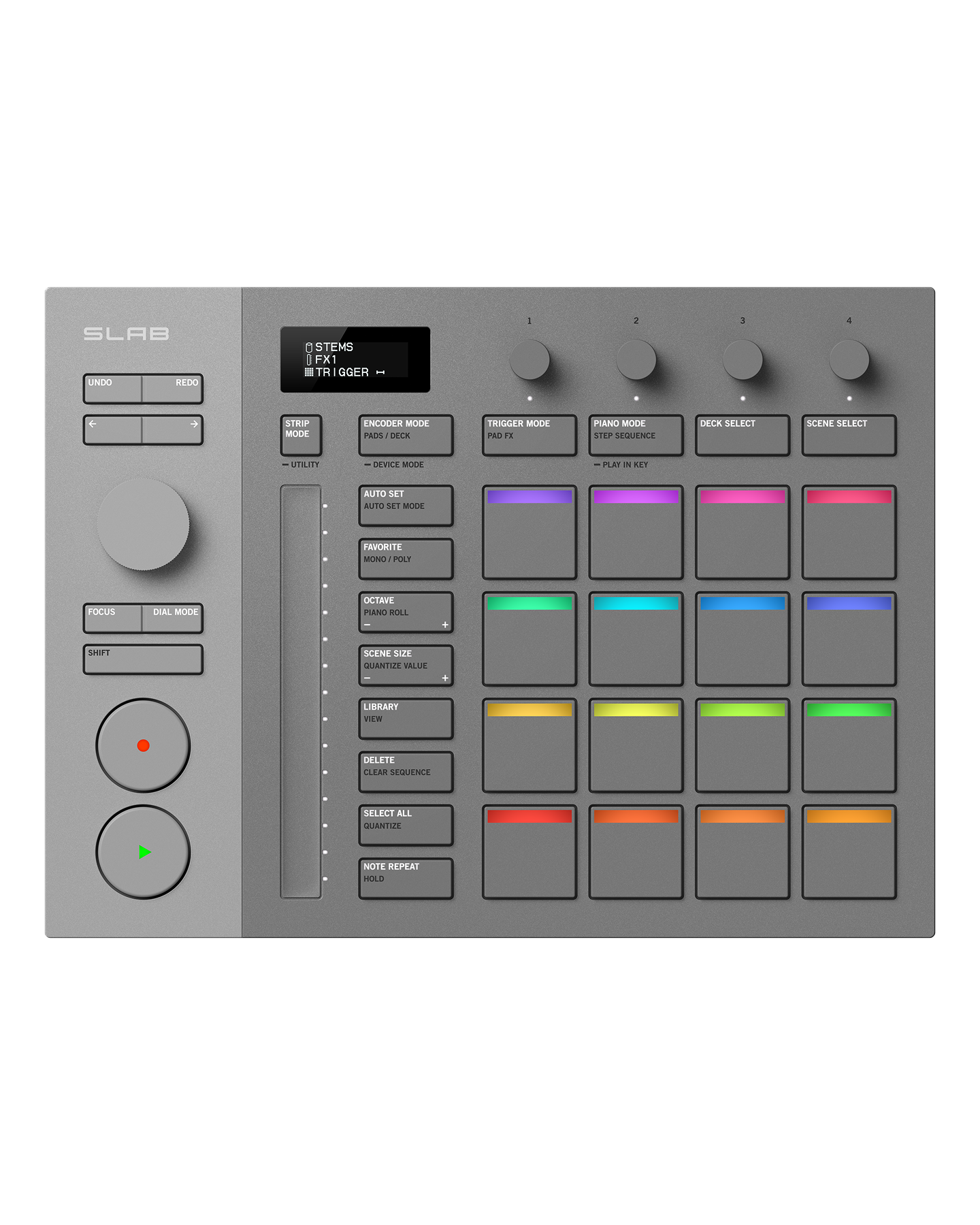
SLAB key features
- Native Serato Studio integration.
- Serato Studio full-version unlock while connected.
- Support for Serato Sample and Serato DJ Pro.
- Large 29 × 29 mm velocity-sensitive pads.
- Adjustable aftertouch.
- Pad, Pad FX, Trigger and Step Sequencer modes.
- Touch strip with RGB indicators.
- Focus Control for plugin parameters.
- Encoder modes for EQ, Stems, FX and parameters.
- Transport section with Play and Record controls.
- Universal MIDI mode for other DAWs.
- USB-C connection and bus power.
Performance pads
The pads are the centre of the SLAB workflow. Each measures 29 mm square and supports velocity plus adjustable aftertouch. This gives drum programming and sample triggering much more expression than clicking notes into a grid with a mouse.
Modes include direct pad playing, Pad FX, Trigger and step sequencing. LED bars reflect software states so the controller can communicate what Serato Studio is doing without requiring constant screen watching.
Serato Studio integration
SLAB is the first AlphaTheta controller built specifically around Serato Studio’s workflow. It can navigate sounds, control parameters, sequence drums, manipulate samples and operate transport functions without extensive custom mapping.
Connecting the hardware unlocks the full version of Serato Studio. Serato Sample requires its own licence, while Serato DJ Pro must already be unlocked by compatible hardware or software licensing when SLAB is used as an accessory.
Focus Control and dial modes
The large central dial can change roles according to the current task, including navigation and scrubbing. Focus Control is intended to let the controller take over plugin parameters without manually assigning every knob, making the workflow faster when moving between instruments and effects.
Encoders for EQ, Stems and effects
Encoder modes cover EQ, Stems, effects and general parameters. This is particularly useful when working with Serato’s stem-separation tools because individual musical elements can be adjusted directly from the controller rather than by mouse.
Touch strip
The touch strip can control parameters such as filter, pitch, effect level and swing. RGB indicators provide visual feedback, making it useful for quick expressive changes during beat-making and performance.
Serato Studio features SLAB can access
- Sample deck with stems separation.
- Step sequencing.
- Over 190 Serato Studio instrument sounds.
- Project key and BPM sync.
- Pitch ‘n Time key shifting and time stretching.
- Keyboard mode and Auto Chords.
- Automation.
- 42 built-in effects in the current Serato Studio environment.
Using SLAB with other DAWs
SLAB is not locked completely to Serato. MIDI mode allows it to act as a general controller for software with MIDI Learn, including DAWs such as Ableton Live, FL Studio and Logic Pro. The deepest plug-and-play functionality remains within the Serato ecosystem.
SLAB strengths
- Deep plug-and-play Serato Studio integration.
- Large expressive pads.
- Aftertouch and velocity support.
- Useful touch strip.
- Serato Studio licence unlock while connected.
- Can also work as a generic MIDI controller.
- Compact and USB powered.
SLAB limitations
- Best value depends on using Serato software.
- Only one USB-C connection.
- No standalone sound engine.
- Serato Sample and some wider software functions require separate licences.
AlphaTheta SLAB full specifications
- Dimensions: 284.3 × 209.0 × 44.6 mm.
- Weight: 1.0 kg.
- Power: DC 5 V.
- Current: 500 mA.
- Connection: USB Type-C.
- Compatible Serato software: Serato Studio, Serato Sample and Serato DJ Pro.
- Operating temperature: +5 °C – +35 °C.
- Operating humidity: 5% – 85% non-condensing.
Frequently asked questions
Does SLAB include Serato Studio?
Connecting SLAB unlocks the full version of Serato Studio while the controller is connected.
Can SLAB work with Ableton Live?
Yes, through its general MIDI mode and the DAW’s own MIDI mapping or MIDI Learn system.
Is SLAB a standalone groovebox?
No. It is a MIDI controller and requires compatible software running on a computer.
Overall view
SLAB is most compelling for producers and DJs already interested in Serato Studio. Its value comes from turning software functions into a tactile instrument rather than replacing the software. Large pads, direct parameter control and the automatic Studio unlock make it much more integrated than a generic MIDI pad controller.
Leave a Reply